
Article Outline
- Introduction to AI Video Generators
- What Are AI Video Generators?
- Why Are They Trending in 2026?
- Rise of AI in Content Creation
- Evolution from Manual to AI Editing
- Impact on Content Creators
- Benefits of Free AI Video Generators
- Cost Efficiency
- Time Saving Automation
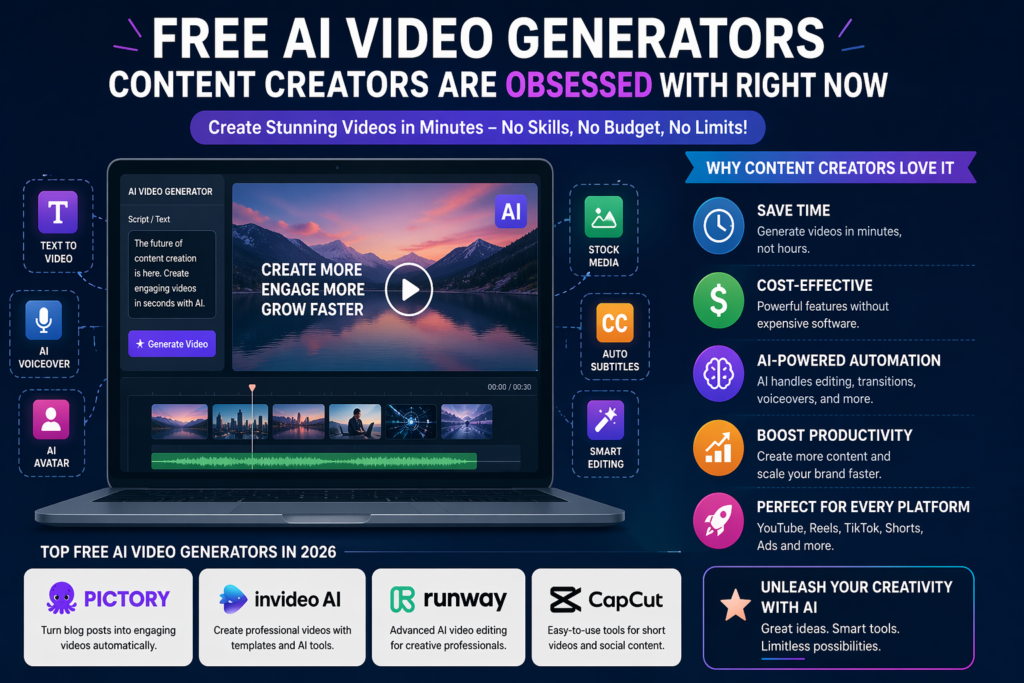
- Top Free AI Video Generators in 2026
- Pictory AI
- InVideo AI
- Runway ML
- CapCut AI
- Features That Make These Tools Popular
- Text-to-Video Conversion
- Voiceover & AI Avatars
- How AI Video Generators Work
- Machine Learning Models
- Automation Pipeline
- Use Cases for Content Creators
- YouTube Videos
- Social Media Reels
- Step-by-Step Guide to Using AI Video Tools
- Selecting a Tool
- Generating a Video
- Comparing Top AI Video Tools
- Limitations of Free AI Video Generators
- Watermarks
- Limited Features
- Future of AI Video Creation
- AI Personalization
- Real-Time Video Generation
- Tips to Get the Best Results
- Script Optimization
- Visual Customization
- Conclusion
- FAQs
Introduction to AI Video Generators
What Are AI Video Generators?
AI video generators are tools powered by artificial intelligence that transform simple text, scripts, or images into fully edited videos. Think of them like your personal video editor that never sleeps. You don’t need advanced editing skills, expensive software, or even a high-end computer. These tools analyze your input and automatically generate visuals, transitions, voiceovers, and even subtitles.
In simple terms, instead of spending hours editing videos manually, you just describe what you want—and AI does the rest. Whether it’s a YouTube explainer, Instagram reel, or promotional ad, these tools can create it in minutes. This has completely changed the way content is produced online.
The real magic lies in technologies like natural language processing and computer vision. They allow AI to understand your script and match it with relevant visuals and audio. It’s like having a creative assistant who knows exactly what you want—even before you fully explain it.
Why Are They Trending in 2026?
Let’s be honest—content creation is exploding. Millions of creators are competing for attention on platforms like YouTube, Instagram, and TikTok. But creating high-quality videos consistently? That’s exhausting.
This is where AI video generators step in. They save time, reduce costs, and increase productivity. In 2026, creators are obsessed with tools that can generate videos in minutes instead of hours. AI tools are no longer just “nice to have”—they’re becoming essential.
Also, the rise of short-form content has made speed crucial. If you’re not posting regularly, you’re falling behind. AI video generators help creators keep up with demand without burning out.
Rise of AI in Content Creation
Evolution from Manual to AI Editing
Remember when editing a video meant hours of cutting clips, adding transitions, syncing audio, and adjusting colors? That process hasn’t disappeared—but it has evolved dramatically.
AI has simplified everything. What used to take days now takes minutes. Instead of manually searching for stock footage, AI tools automatically select relevant clips based on your script. Instead of recording voiceovers, AI generates natural-sounding narration instantly.
This shift is similar to moving from handwritten letters to instant messaging. The core idea remains the same—communication—but the speed and efficiency have changed everything.
Impact on Content Creators
For creators, this is a game changer. Beginners can now produce professional-quality videos without technical skills. Experienced creators can scale their output and focus more on creativity rather than editing.
AI tools also reduce dependency on teams. A single creator can now do the work of an entire production team. This democratizes content creation—anyone with an idea can bring it to life.
Benefits of Free AI Video Generators
Cost Efficiency
One of the biggest advantages is cost. Traditional video production involves cameras, editing software, and sometimes hiring editors. That’s expensive.
Free AI video generators eliminate most of these costs. While some tools offer premium plans, their free versions are powerful enough for beginners and even intermediate creators.
This is especially useful for students, startups, and solo creators who don’t have big budgets.
Time Saving Automation
Time is money—and AI saves both. Instead of spending hours editing, you can generate a video in minutes. This allows creators to focus on strategy, storytelling, and audience engagement.
Automation also reduces repetitive tasks. Things like adding subtitles, syncing audio, and selecting clips are handled automatically.
Top Free AI Video Generators in 2026
Pictory AI
Pictory is popular for turning blog posts into videos. It’s perfect for bloggers who want to repurpose their content into engaging videos.
InVideo AI
InVideo offers powerful templates and AI features for creating social media videos. It’s beginner-friendly and versatile.
Runway ML
Runway is more advanced and offers features like AI video editing and background removal. It’s loved by professionals.
CapCut AI
CapCut is widely used for short-form content like reels and TikToks. Its AI features make editing fast and simple.
Features That Make These Tools Popular
Text-to-Video Conversion
This is the core feature. You input text, and the AI generates a video. It selects visuals, adds transitions, and even creates subtitles automatically.
Voiceover & AI Avatars
Many tools offer AI voiceovers that sound surprisingly human. Some even provide AI avatars that can “present” your video.
How AI Video Generators Work
Machine Learning Models
These tools use trained models to understand language and visuals. They analyze your script and match it with relevant media.
Automation Pipeline
The process includes:
- Script analysis
- Media selection
- Voice generation
- Video rendering
All of this happens in seconds.
Use Cases for Content Creators
YouTube Videos
AI tools are perfect for explainer videos, tutorials, and storytelling content.
Social Media Reels
Short-form videos are the future. AI helps you create engaging reels quickly.
Step-by-Step Guide to Using AI Video Tools
Selecting a Tool
Choose based on your needs. If you want quick reels, go for CapCut. For longer videos, try InVideo or Pictory.
Generating a Video
- Enter your script
- Choose a template
- Customize visuals
- Add voiceover
- Export
Comparing Top AI Video Tools
| Tool | Best For | Free Plan | Key Feature |
|---|---|---|---|
| Pictory | Blog to video | Yes | Auto summarization |
| InVideo | Social media ads | Yes | Templates |
| Runway ML | Advanced editing | Yes | AI editing tools |
| CapCut | Short videos | Yes | Mobile-friendly editing |
Limitations of Free AI Video Generators
Watermarks
Most free tools add watermarks. This can affect branding.
Limited Features
Advanced features are often locked behind paid plans.
Future of AI Video Creation
AI Personalization
Future tools will create personalized videos for each viewer.
Real-Time Video Generation
Imagine generating videos instantly during live streams. That’s where things are heading.
Tips to Get the Best Results
Script Optimization
A good script leads to a good video. Keep it clear and engaging.
Visual Customization
Don’t rely entirely on AI. Customize visuals to match your brand.
Conclusion
AI video generators are not just a trend—they’re the future of content creation. They make video production faster, cheaper, and more accessible. Whether you’re a beginner or a professional, these tools can help you scale your content and stay competitive.
The obsession around these tools is completely justified. They remove barriers and empower creators to focus on what truly matters—telling great stories. If you haven’t tried one yet, now is the perfect time.
❓ FAQs
1. Are free AI video generators really free?
Yes, most offer free plans, but they may include limitations like watermarks or restricted features.
2. Can AI completely replace video editors?
Not entirely. AI handles repetitive tasks, but creativity still requires human input.
3. Which AI video tool is best for beginners?
CapCut and InVideo are great for beginners due to their simple interfaces.
4. Do AI videos rank well on YouTube?
Yes, if the content is engaging and optimized, AI-generated videos can perform very well.
5. Is AI video creation legal?
Yes, as long as you use licensed media and follow platform guidelines.